Hello Community,
Does anyone know if Gliph allows cumulative dimensions in plan view starting at a coordinate axis point?
Greetings
Hi @DiFede,
Could you provide an example of what you’re looking for? Also, which category are you trying to dimension?
Thank you,
Miguel
Hi,
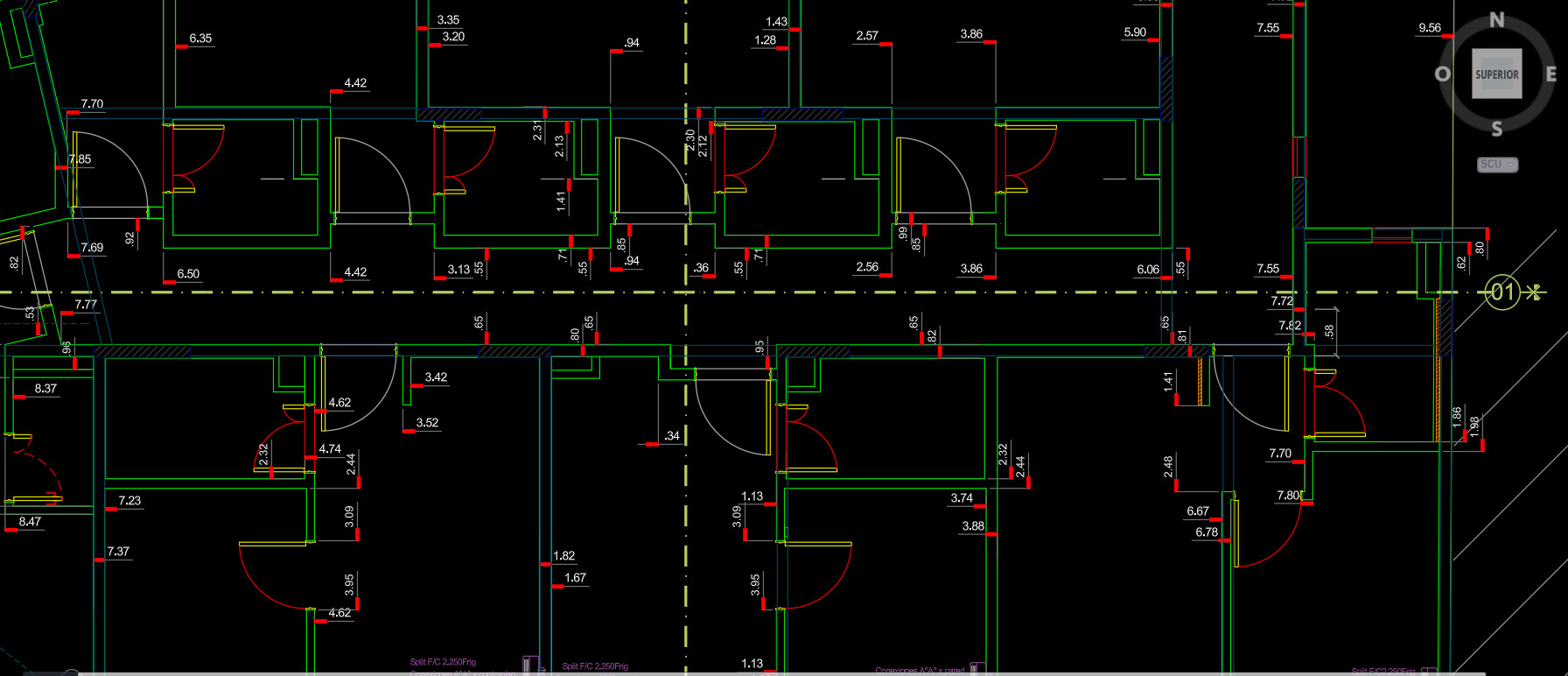
This is for dimensioning walls with accumulated dimensions along an X/Y axis as references, for accumulated dimensions based on the axes (it could also be a point, which distinguishes up/down and left/right).
Greetings
@DiFede,
Thank you for providing more information! We currently only support this type of dimension for the Ducts and Pipes categories, but I’ve just added this feature to our roadmap!
Thank you,
Miguel
1 Like
Hi Miguel,
Thanks for the reply, and we look forward to this new feature !
Greetings.
1 Like
Hi Miguel and Happy New Year 2026!
May we continue to enjoy Gliph in 2026 with new features! Accumulated dimensions along an axis would be one of them.
Regards
1 Like
Hi @DiFede, we’re planning to add this feature in 2026 to the Walls category. You’ll be able to select specific grids in the UI, and Glyph will automatically dimension all walls to those grids.
Are you mainly dimensioning interior walls to those axes, or do you also dimension exterior walls to the axes/grids?
If you have any other suggestions on how we can make Glyph better, please let us know.
Thank you!
Hi Miguel,
Rather than grids, here in Argentina we use pairs of axes (both X and Y) on the different floors of the building to locate both interior and exterior walls, using accumulated dimensions. Each interior or exterior wall will be referenced to these axes, X and Y, through cumulative dimension.
The image I sent previously only has one pair of axes, since the floor plans were small.
I hope this answers your question.
Regards!
Hi @DiFede, which category in Revit are you using to create those axes? It looks like that image might be an image from AutoCAD.
Hi Miguel,
yes, the image is indeed from AutoCAD, but it can also be done in Revit, using the Linear Dimension style and configuring the Stakeout Dimension. I’m sending an image.
If you have any questions, please let me know.
Regards!
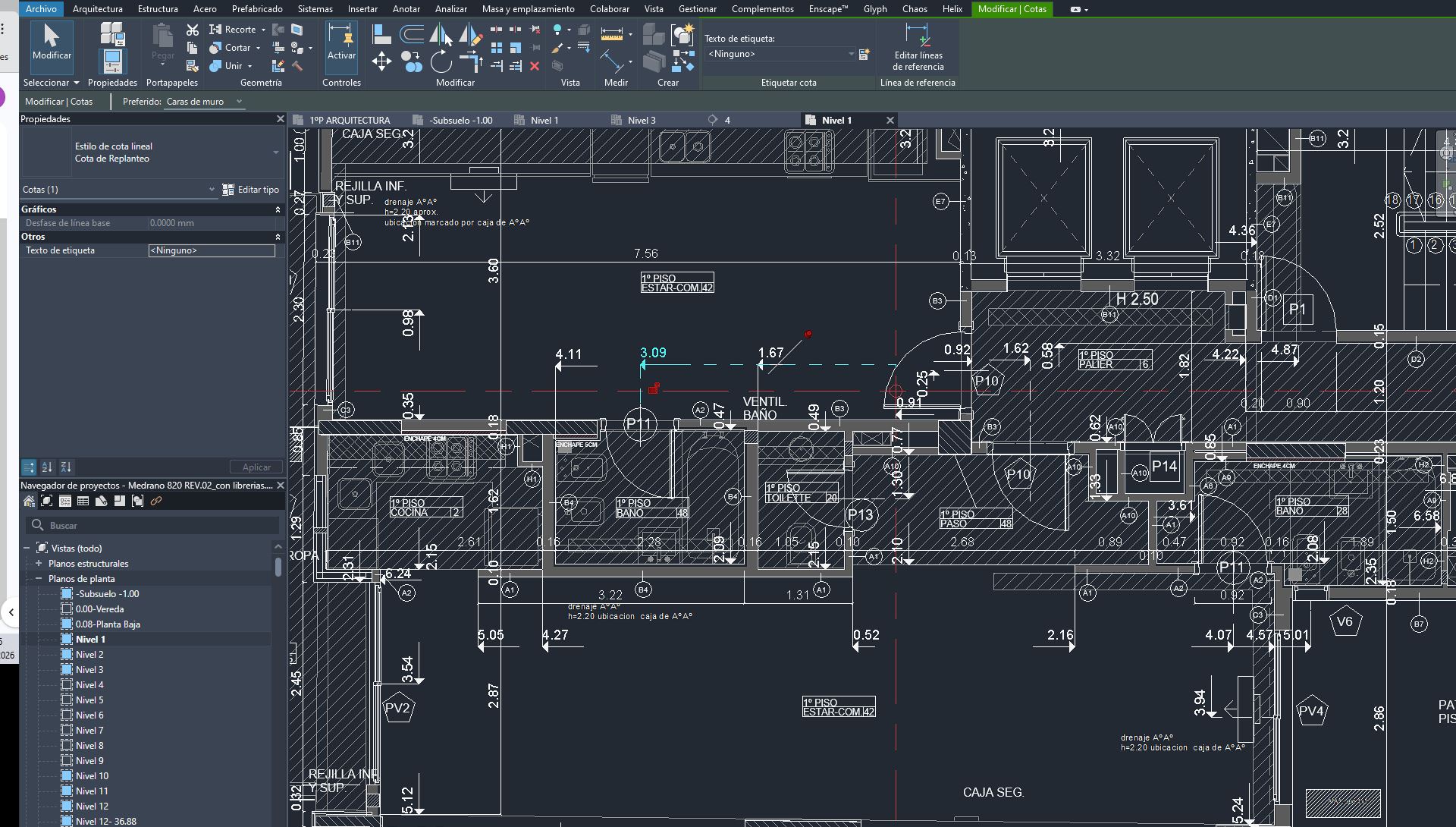
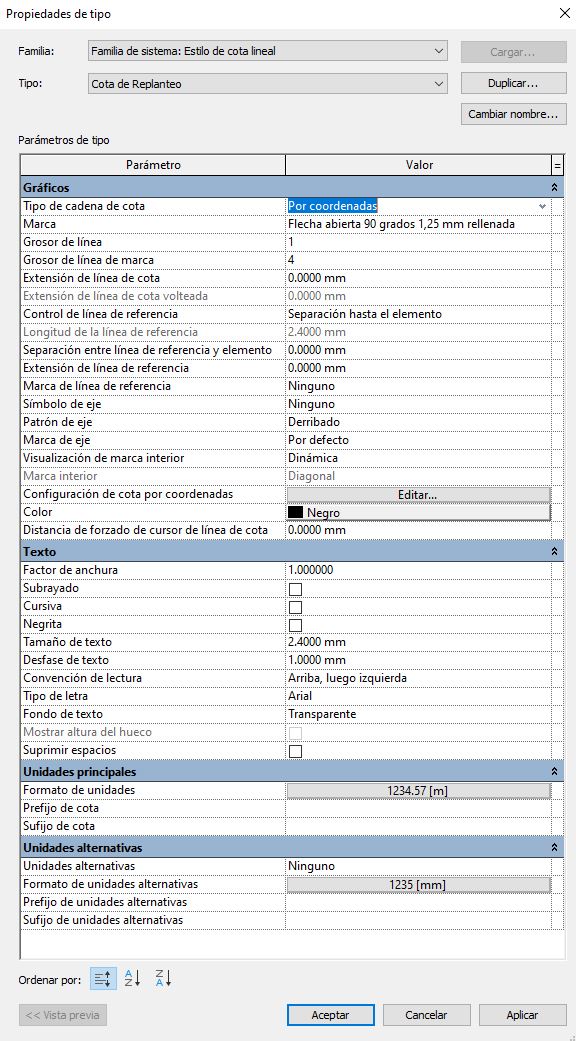
Thank you for the additional information. How are the red lines in your image (your axes) modeled: are they lines, grids, or something else?
At the moment, we are planning to add a UI that will allow you to select or name specific grids (which will act as axes, since grids contain label information), so that all of these dimensions can be tied to those axes. That way, users can specify in the UI that Glyph should tie the walls to Grid G3 and Grid A3 (for example).
Would this work for you?
Thanks,
Miguel
Hi Miguel,
The red lines or axes are placed in a way that conveniently covers the largest number of walls to be dimensioned and avoids passing through gaps. The accumulated dimensions are referenced to these axes. This prevents the need for too many axes. From what you’re saying, this grid system would result in many axes with dimensions short to those axes, which would complicate the layout (on a small area, several axes would have to be established). The aim of using a single axis is to simplify this process and ensure that the dimensions are cumulative and reasonable.
Regards
Hi @DiFede, the grid feature I am referring to will work the same way as your current axes. You can select one or two grids, and the walls will be tied only to those grids. If you are currently using detail lines to create those axes, we are unable to reproduce this feature in Glyph. However, if we use the Revit Grids category, we will be able to achieve exactly what you are looking for.
Thanks,
Miguel
Hi Miguel,
I understand what you’re saying. In this case, the grids (or rejillas in Spanish) you mentioned should work the same way as the detail lines I used in Revit previously. What wasn’t clear to me from your previous email was whether these grids would be for individual rooms or if there would be an option to select a single pair of axes for multiple rooms. Now it’s clear.
I’m really looking forward to the release of this new feature and wish you the best of luck with your development, which the community appreciates!
Regards!
1 Like
Hi @DiFede,
We’re happy to announce that the feature you requested has been included in our newly released Glyph 3.1.
Thank you for the suggestion!
Miguel
Hi Miguel,
Congratulations on achieving this new feature! I hope it helps and is useful to the community!
Regards and thank you very much for your work!
1 Like
Hi Miguel,
I tried the new “Wall axis/grid dimension to reference” option and it works perfectly.
Congratulations to you and the team! And thank you!
1 Like
Hi @DiFede, thank you for testing the feature and for the kind words.
Please feel free to reach out if you have any other suggestions. We really appreciate all feedback.
Thank you!
Miguel