@kcrawford - thank you for the question
@Dave - thank you for highlighting the main benefits
I went ahead and dove a bit deeper in this question to provide more details below.
The comparison below is based on Veras through Release 4.4.
Veras v7 vs. Standalone Nano Banana: Comparison
Summary
Veras v7 and standalone Nano Banana Pro use the same underlying model (Gemini 3 Pro Image). So why use Veras? The integration. Veras is a professional tool purpose-built for design workflows, and the features it layers around the model are what make the difference.
1. A Tool Built for Professionals
Standalone Nano Banana gives you a model. Veras gives you a production environment inside your design app:
- Lives in your design app: no context-switching to a browser or separate tool. You render from within Enscape, Revit, Rhino, SketchUp, Forma, Allplan, Vectorworks, or Archicad.
- Keyboard shortcuts: fast, muscle-memory-driven workflows for iterating quickly.
- Preset system: save and reuse prompt/setting combinations across projects. No need to re-engineer your favorite configurations each time.
- Custom Style Chips: one-click prompt-assist tags that let you dial in the visual style of your render instantly. Create and save your own prompt snippets for fast access to specific aesthetics — not possible standalone.
- Built-in sketching and annotation tools: mark up and guide the AI directly on your viewport without leaving the plugin.
- Saved renderings with full settings: every render is stored with its complete configuration (prompt, seed, references, settings), so you can revisit and reproduce any result.
- Gallery mode: browse all your renderings in one place, with favoriting and organizing tools to curate final selections. Drag renders directly from the thumbnail strip to set them as your source image.
- Canvas Filters: real-time post-processing controls for brightness, contrast, saturation, blur, and more — applied directly on the canvas. Filter settings are saved to the cloud per render and persist across sessions. Not available standalone.
- Single stop shop: rendering, upscaling, refinement, inpainting, video generation, and video combining — all in one interface. Select multiple video renders and stitch them into a single output with multi-select and the Combine button, perfect for assembling walkthroughs or presentation sequences.
- Model access: Veras gives you access to both Nano Banana Pro (Gemini 3 Pro Image) and Nano Banana 2 (Gemini Flash Image 3.1 Preview) — a faster, higher-quota option with similar quality — switchable within the same workflow.
None of this exists in the standalone model. You’d be stitching together multiple tools and manually tracking everything.

2. Access to Design App Metadata
This is where the integration goes deeper than convenience. Because Veras is embedded in your design application, it has access to data that a standalone model simply cannot see:
Inpainting with CAD Intelligence
Veras generates inpainting masks from Enscape material IDs and object IDs. You can click a wall material in your model and selectively regenerate just that surface. With standalone Nano Banana, you’d need to manually paint masks in a separate app for every edit.

Camera State Persistence
The plugin captures your exact camera position, target, FOV, and up vector, enabling consistent multi-angle perspectives from the same model. This is automatic in the plugin. Standalone, you’d be taking manual screenshots with no guarantee of consistency between iterations.
3. Precision & Control
Veras provides workflow features that are non-trivial to replicate manually:
Typed Reference Images
Veras v7 supports reference images with semantic typing:
| Type | Purpose |
|---|---|
| Style | Influences visual aesthetics |
| Material | Influences material/texture appearance |
| Color | Influences color palette |
| Object | Influences furniture/fixtures |
| Design Lock | Replicates architectural design language across views |
| Custom | User-provided freeform instruction |
These are encoded and sent with type metadata that tells the model exactly how to apply each reference. With standalone Nano Banana, you have to add significant additional prompting to associate images with the correct intent, and the model sometimes misunderstands if instructions aren’t perfectly clear. Veras simplifies this into a single drag-and-drop interaction.
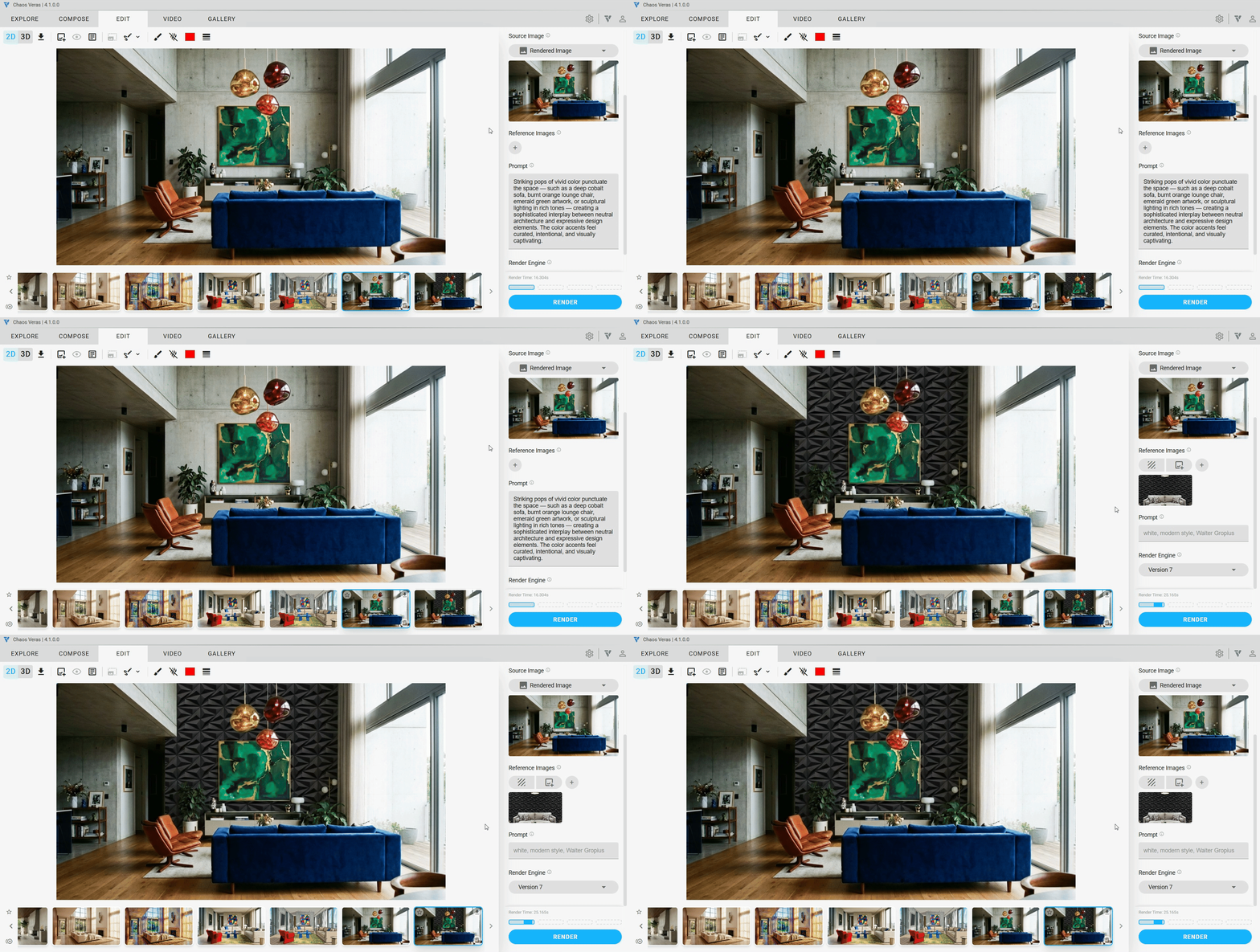
Design Lock — Persistent Design Language Across Views
Design Lock is a reference image type that extracts the architectural design language from a reference image — replicating detailing, trim profiles, railing patterns, molding proportions, and panel layouts — without altering your model’s primary structure. This enables AI-generated elements (skylights, railings, cladding patterns) to persist consistently across multiple views of your design. With standalone Nano Banana, there is no mechanism to carry design intent across separate renders — each generation is independent.
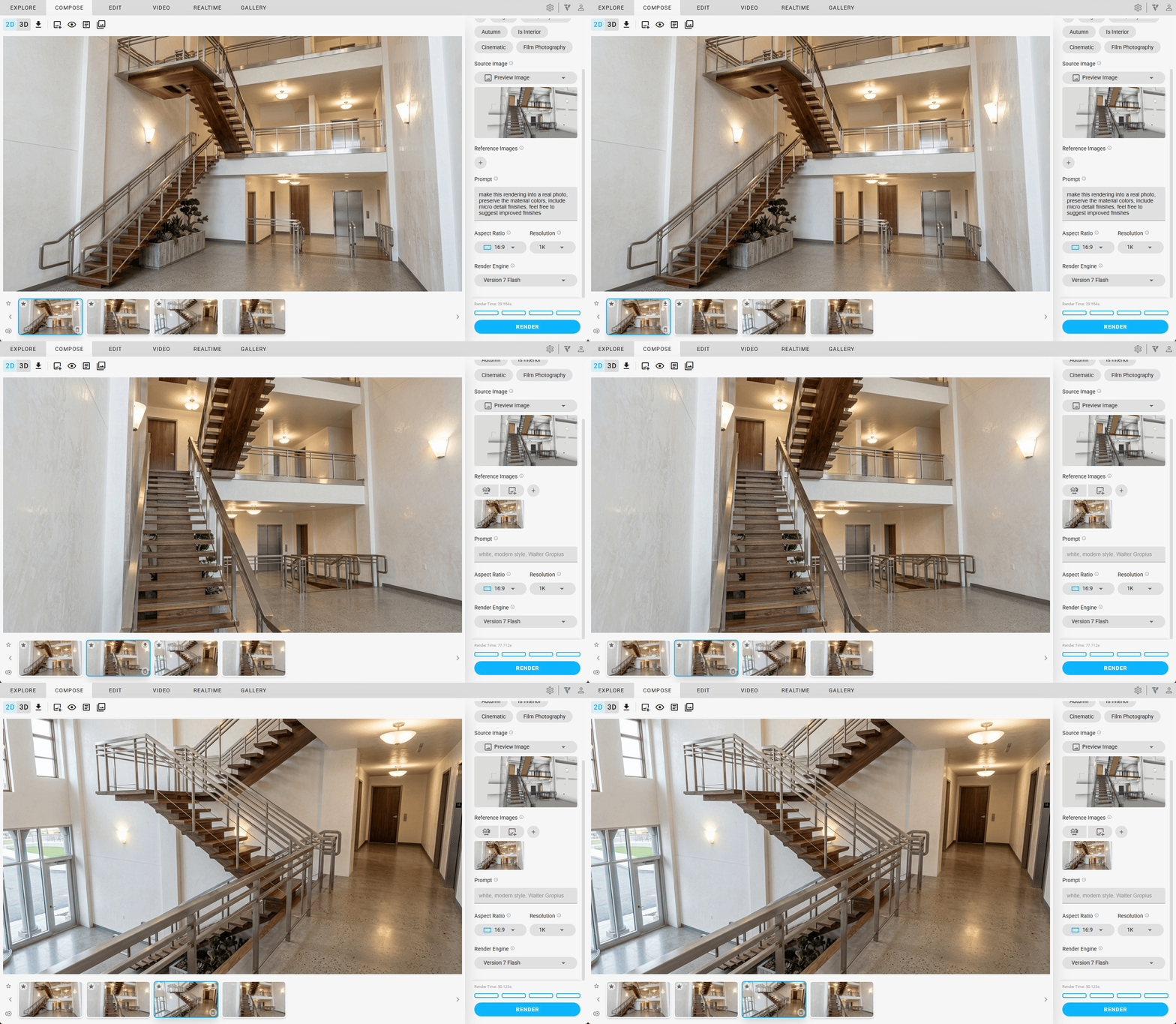
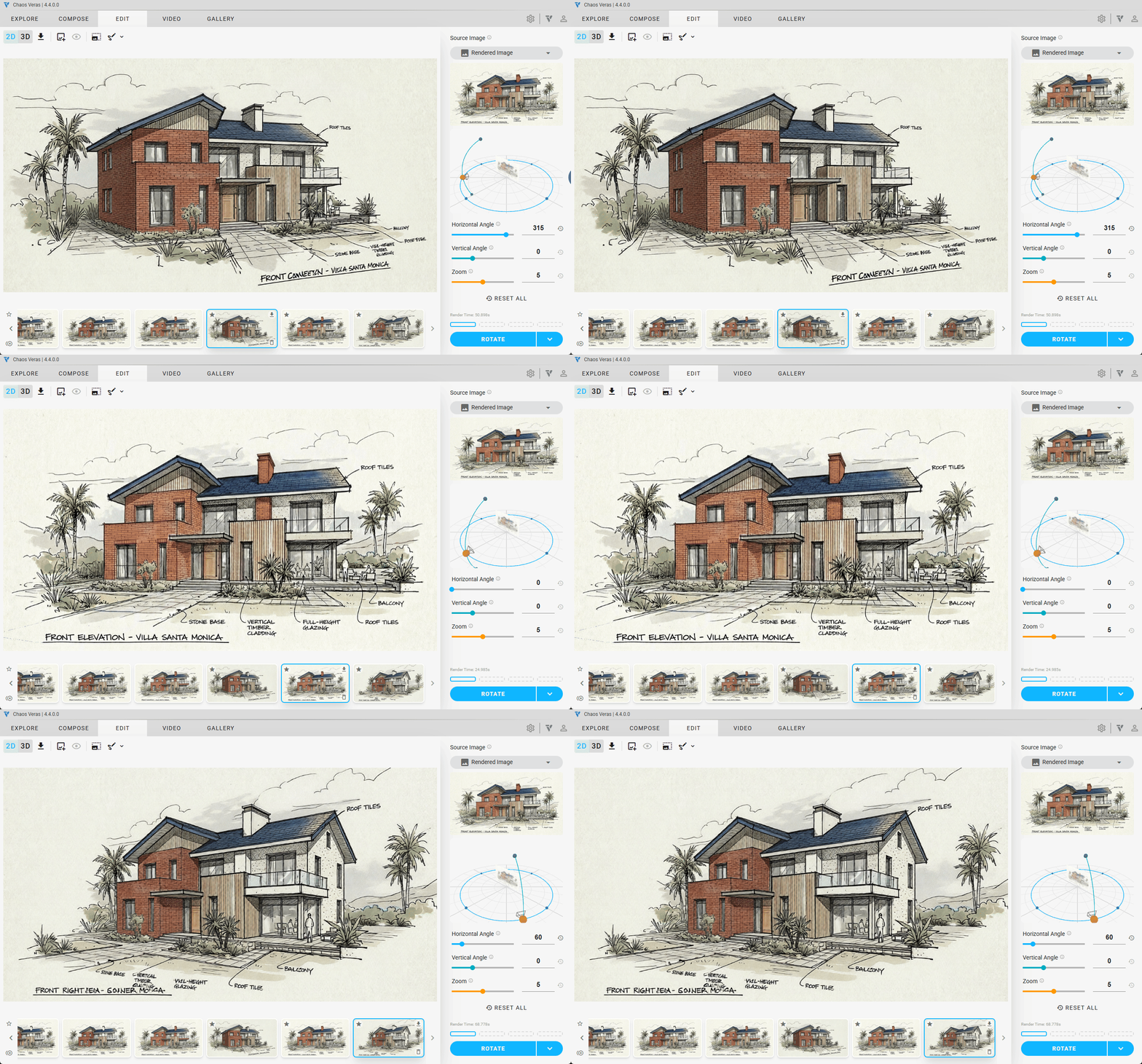
Rotate Image
Veras lets you reorient any source image in 3D — adjusting pitch, yaw, and roll with an interactive preview — and generate a fresh render from the new viewpoint. This unlocks new angles from a single source image without needing to return to your 3D model or take new screenshots. You can even chain rotated frames into a video. Standalone, this requires manually sourcing or re-rendering from a different camera angle entirely.
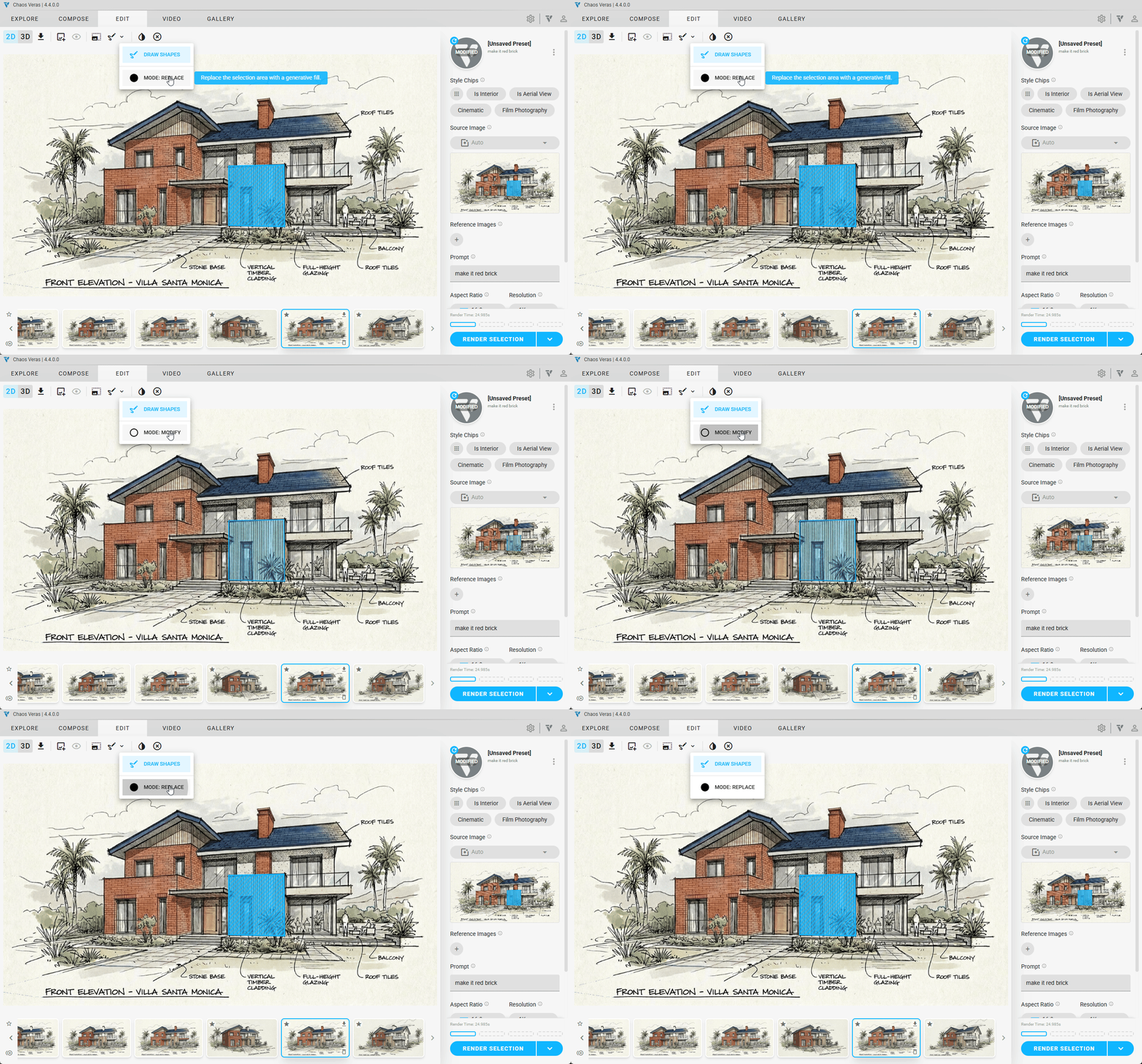
Render Selection Modes — Modify & Replace
When working in Refine mode on Nano Banana, Veras gives you two dedicated selection modes that understand your model’s intent:
- Modify: preserves underlying geometry and edits dimensions, materials, or finishes while retaining structure. Standalone has no equivalent — you’d need to carefully prompt around what to keep.
- Replace: discards the selection and generates a fresh new idea for that area — useful for reimagining part of a building or scene without touching the rest.
With standalone Nano Banana, this level of targeted, model-aware selection does not exist.
Feature Comparison
| Feature | Veras v7 | Standalone Nano Banana |
|---|---|---|
| Runs inside your design app | Yes | No |
| Keyboard shortcuts | Built-in | N/A |
| Presets (save/reuse settings) | Built-in | Manual tracking |
| Custom Style Chips | Built-in | Not available |
| Sketching & annotation tools | Built-in | Separate app |
| Canvas Filters | Built-in | Not available |
| Typed reference images | Drag-and-drop with 6 types | Manual prompting only |
| Design Lock (cross-view persistence) | Built-in | Not available |
| Inpainting by material/object | One-click from Enscape/Revit/SketchUp… | Manual mask painting |
| Render selection (Modify/Replace) | Built-in | Not available |
| Rotate Image | Built-in | Not available |
| Camera-synced viewport capture | Automatic | Manual screenshots |
| Saved renderings with settings | Full history with gallery | Not available |
| Video generation & combining | Built-in | Not available |
| First & Last Frame video control | Built-in | Not available |
| Favoriting & organization | Built-in | Not available |
Bottom Line
The underlying AI model is the same. If your workflow is screenshot → prompt → accept result, you can replicate the core rendering standalone.
But if your workflow involves iterative refinement — trying variations, swapping reference images, selectively regenerating materials, maintaining camera consistency across angles, locking design language across views, rotating viewpoints without re-opening your model, and organizing results — then Veras turns all of that into a streamlined pipeline inside the tool you’re already working in.